Chapter 6: Seeing Light — The 8 Viewport Shading Modes & Overlays
A traditional CAD program only shows you the wireframe outline of a gemstone. ProFacet goes much further: its 3D Viewport integrates 8 real-time optical and geometric shading modes so you can switch at any moment between structural meetpoint inspection, photorealistic spectral rendering, and laboratory-grade angular light return maps.
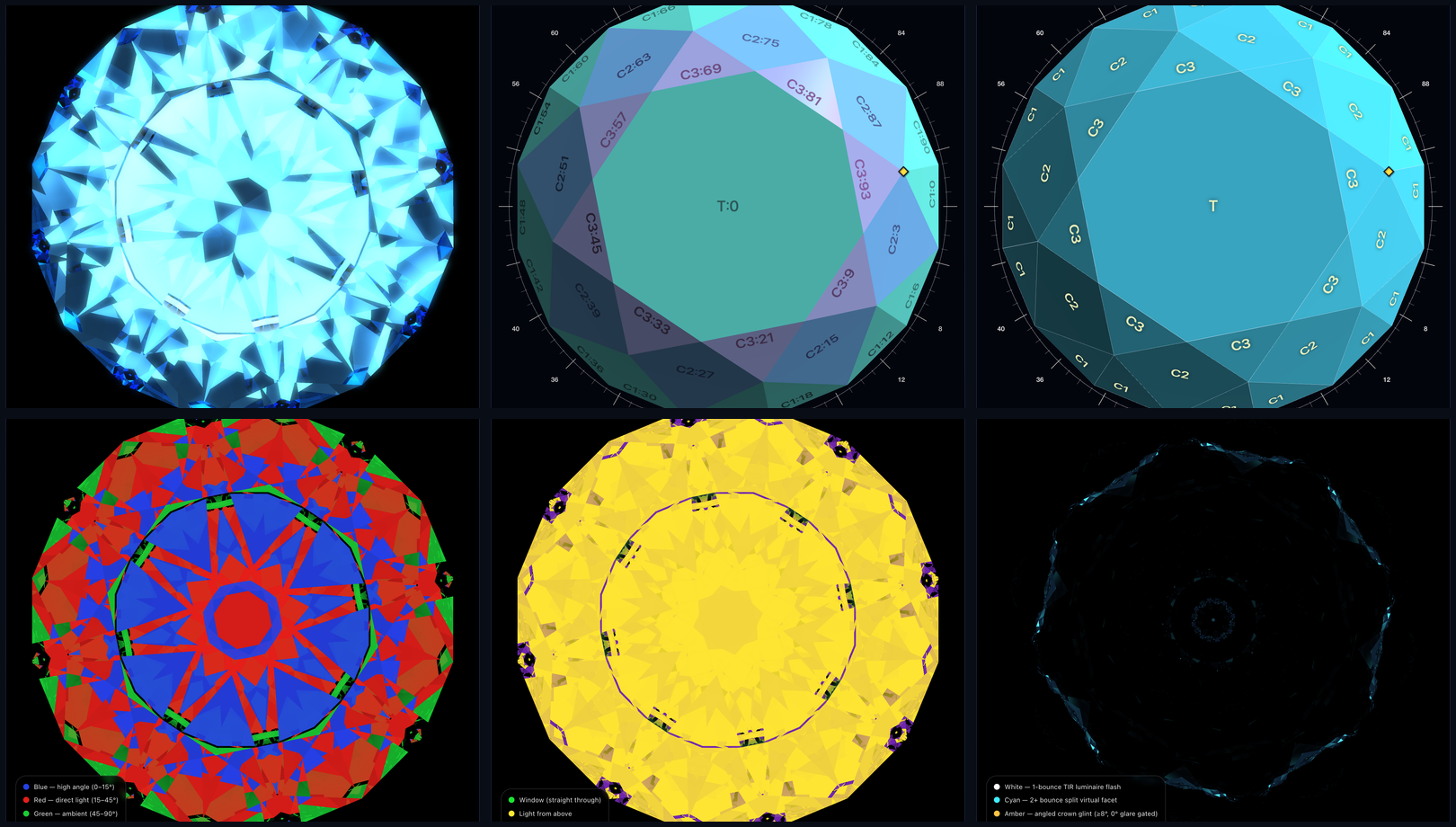
(Shown above, top row left to right: Raytraced, Palette + Facet Info, Mono + Wireframe. Bottom row left to right: ASET Angular Map, Window Leakage Map, Scintillation Flash Map.)
1. Geometric & Slicing Modes (Palette and Mono)
When you are cutting or editing facets in the Interactive Slicer, always use Palette or Mono:
Palette(Tier Color Palette): Assigns a distinct color to each tier (P1,P2,C1,C2,C3,T) while shading facets by surface angle. Makes it effortless to verify that all facets in a tier have equal size and clean meetpoints.Mono(Uniform Monochrome): Renders the entire stone in a clean metallic-slate finish. PairMonowith the Wireframe and Facet Info overlays for classic blueprint-style inspection.
[!NOTE] Why Doesn't the Slicer Disc Appear in
RaytracedMode? Physical raytracing traces multi-bounce internal light paths through a closed dielectric volume. To show the translucent Slicer cutting plane, vertex snap rings, and clickable golden meetpoint diamonds (♦), switch the view dropdown toPaletteorMono.
2. Photorealistic Optical Renderers (Raytraced and BDPT)
Raytraced(Real-Time Spectral Whitted Raytracer):- Runs interactively at 60 FPS as you orbit the stone.
- Simulates Snell's law refraction, Total Internal Reflection (TIR), Fresnel polarization reflectance, Cauchy spectral dispersion (splitting white light into rainbow fire), Beer-Lambert body color absorption (
colorandabsorption), and optional Bloom Glow.
BDPT(Bidirectional Path Tracer):- Connects light paths simultaneously from the luminaire environment and from the camera eye to resolve subtle multi-bounce caustics, internal facet reflections, and studio lighting realism.
- Hold the camera still for a few seconds in
BDPTmode to watch the progressive sample accumulator converge to a noise-free photograph.
3. Diagnostic Optical Maps (ASET, Window, Fire, Scintillation)
How do professional gemologists and optical designers diagnose why one cut looks lively and brilliant while another looks dark or glassy? They use four specialized false-color diagnostic maps. When you select any of these modes, ProFacet automatically displays a live color legend in the bottom-left corner of the viewport:
A. ASET (Angular Spectrum Evaluation Tool)
Maps every pixel on the crown to the hemisphere elevation angle of the light ray that exited toward your eye:
| ASET Color | Source Angle Zone | Optical Meaning & What to Look For |
|---|---|---|
| 🔴 Red | 15° – 45° (Direct High-Angle Light) | Primary Brilliance. Rays entering from overhead room lighting that reflect cleanly back to your eye. Aim for rich, symmetrical Red coverage across the table and crown. |
| 🔵 Blue | 0° – 15° (Viewer Obscuration) | Structured Contrast. Steep rays blocked by the viewer's own head and camera lens. Balanced Blue zones (such as crisp dark arrows in a Round Brilliant) create the high-contrast checkerboard pattern that makes neighboring Red facets "pop"! |
| 🟢 Green | 45° – 90° (Low-Angle Horizon Light) | Secondary Ambient Return. Grazing light entering from near the horizon. |
| ⚫ Black | Back Hemisphere / Dead Zone | Light Leakage (Windowing). Rays that leaked straight out the bottom of the pavilion instead of reflecting upward. Aim to eliminate Black in the center of the stone! |
B. Window (Light Leakage Isolation Map)
Dedicated specifically to hunting down pavilion light leakage as you tilt and orbit the stone:
- 🟢 Bright Green (
Window — straight through): Marks exact regions where your line of sight passes straight through the bottom of the pavilion! If you see Green under the table at0°tilt, your Pavilion main angles are below the material's critical angle (θc). - 🟡 Yellow (
Light from above): Healthy internal reflection returning light from the upper hemisphere. - 🟣 Purple (
Light from below): Secondary rays entering through the pavilion from behind yet exiting the crown at oblique angles.
C. Fire (Chromatic Dispersion Map)
Visualizes angular separation between red (650 nm) and violet (400 nm) wavelengths exiting the crown facets. High-intensity rainbow bands show which crown facets act as strong prisms when the stone rocks under point-source lighting.
D. Scintillation (Virtual Facet & Dynamic Flash Map)
Classifies every virtual facet by its internal bounce count and flash mechanism:
- ⚪ White (
1-bounce TIR luminaire flash): Bold, high-intensity primary flashes. - 🩵 Cyan (
2+ bounce split virtual facet): Finely divided multi-bounce virtual facets that produce rapid pinpoint sparkle during tiny hand movements. - 🟠 Amber (
Angled crown glint ≥ 8°): Surface reflections off angled crown facets (with0°flat table glare automatically gated out). - ⚫ Cobalt / Black (
Collector contrast / window): Dark contrast framing that separates bright flashes.
4. Display Overlays (⌄ Top-Left Menu) & Camera Presets
Click the ⌄ (Show display options) button in the top-left corner of the 3D viewport to toggle seven inspection overlays:
Facet Info: DrawsTier:Indexlabels (e.g.P1:0,C2:72) on every 3D facet.Wireframe: Overlays crisp geometric edge lines on any shading mode.Bottom Light: Toggles rear pavilion illumination in raytraced views.Antialiasing: Enables supersampled edge smoothing inRaytracedmode.Bloom Glow: Adds a soft optical starburst glow around intense highlights inRaytracedmode.Explosion: Radially separates all facets outward from the center of the stone so you can inspect tier structure visually.Orthographic View: Switches between realistic 3D perspective camera and distortion-free orthographic CAD projection.
At the bottom-left of the viewport, use Flip View and the Crown | Profile | Pavilion preset buttons to snap the camera to exact orthographic inspection angles with a single click.
Next, see how ProFacet quantifies all of these optical properties across 19 tilt angles—and optimizes your stone's angles automatically on the GPU—in Chapter 7: Optical Analysis & Automated GPU Optimization.