Chapter 5: Decoding Classic Diagrams — The Symmetry Assistant
Open any classic gem-cutting book, guild newsletter, or magazine diagram and you will see cutting tables where each tier lists a long string of ascending index numbers:
96-12-24-36-48-60-72-8402-10-14-22-26-34-38-46-50-58-62-70-74-82-86-9404-08-16-20-28-32-40-44-52-56-64-68-76-80-88-92
When you are transcribing that printed sheet into ProFacet’s Interactive Slicer (or writing an FSL script), how do you convert 04-08-16-20... into the three drum dials (IDX, SYM, and MIR) without pausing to do mental math?
ProFacet’s Symmetry Assistant solves this for you instantaneously.
1. Using the Symmetry Assistant (? Button)
- In the top-left corner of the Slicer's Precision Dial Deck, click the
?button directly beneathDial. - The Symmetry Assistant (
ADVANCED TOOLS · REVERSE SOLVER) dialog opens for your active gear:
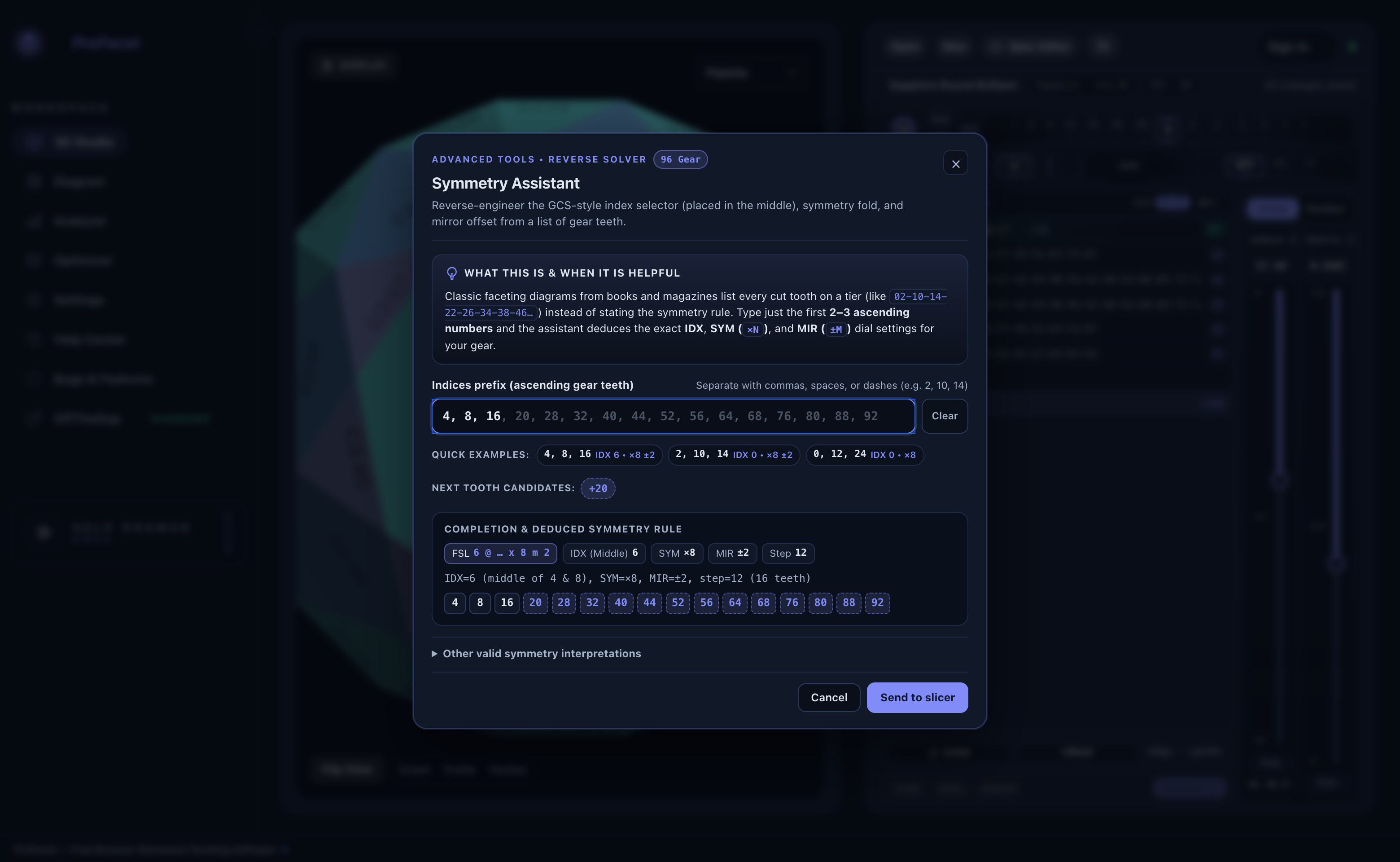
- Type just the first 2 or 3 ascending tooth numbers from your printed diagram into the
Indices prefixinput (for example,4, 8, 16or02-10-14-22), or click one of the Quick Examples pills. - As you type, the Symmetry Assistant:
- Completes the entire 360° tooth loop in ghost text and individual tooth chips (
4, 8, 16, 20, 28, 32, 40, 44, 52, 56, 64, 68, 76, 80, 88, 92) so you can verify that it matches your printed diagram. - Displays the exact FSL rule (
FSL 6 @ ... x 8 m 2) and dial settings (IDX (Middle) 6,SYM ×8,MIR ±2,Step 12). - Offers Next Tooth Candidates if only 1 or 2 teeth have been entered.
- Completes the entire 360° tooth loop in ghost text and individual tooth chips (
- Click
Send to slicer—ProFacet sets yourIDX,SYM, andMIRdrums to that exact symmetry rule immediately!
2. The Simple Logic Behind IDX, SYM, and MIR
Why did 4, 8, 16, 20, 28, 32... translate to IDX = 6, SYM = ×8, MIR = ±2?
- Look at the first pair of teeth (
4and8):- The symmetry axis sits right in the middle of the pair:
IDX = (4 + 8) / 2 = 6. - The distance from the middle (
6) out to4and8isMIR = ±2(6 - 2 = 4and6 + 2 = 8).
- The symmetry axis sits right in the middle of the pair:
- Look at the next pair (
16and20):- Its middle is
(16 + 20) / 2 = 18. - The step from the first pair's middle (
6) to the second pair's middle (18) is18 - 6 = 12teeth. - On a
96gear, stepping by12teeth repeats96 / 12 = 8times around the circle:SYM = ×8.
- Its middle is
[!TIP] Mirror Delta (
xN m M) vs. Zero-Axis Mirror Shorthand (xxN) in FSL InIDX @ angle : ... xN m M,IDXis the mirror axis (center) and the numberMaftermis the±delta index (IDX - MandIDX + M). By contrast, in the classic shorthandM @ angle : ... xxN,Mis the actual cut tooth, mirrored across index0(0 ± M).
- That means
0 @ 43.0 : gp() x8 m 3(mirror axis0with±3delta, cutting03-09-15-21...) is 100% equivalent to3 @ 43.0 : gp() xx8!- Be careful:
3 @ 43.0 : gp() x8 m 3places the mirror axis at3with a±3delta (3 - 3 = 0and3 + 3 = 6), which cuts00-06-12-18...instead!
3. Quick Lookup Table: Common 96-Gear Printed Sequences
Printed Tooth Sequence (96 Gear) | Facet Count | IDX (Axis) | SYM | MIR (Delta) | FSL Syntax (xN m M / xxN) |
|---|---|---|---|---|---|
96-12-24-36-48-60-72-84 | 8 | 0 | ×8 | OFF | 0 @ angle : ... x8 |
06-18-30-42-54-66-78-90 | 8 | 6 | ×8 | OFF | 6 @ angle : ... x8 |
03-09-15-21-27-33-39-45-51-57-63-69-75-81-87-93 | 16 | 0 (or 6) | ×8 | ±3 | 0 @ angle : ... x8 m 3 (or 3 @ angle : ... xx8) |
02-10-14-22-26-34-38-46-50-58-62-70-74-82-86-94 | 16 | 0 (or 6) | ×8 | ±2 (or ±4) | 0 @ angle : ... x8 m 2 (or 2 @ angle : ... xx8) |
04-08-16-20-28-32-40-44-52-56-64-68-76-80-88-92 | 16 | 6 (or 0) | ×8 | ±2 (or ±4) | 6 @ angle : ... x8 m 2 (or 4 @ angle : ... xx8) |
96-16-32-48-64-80 | 6 | 0 | ×6 | OFF | 0 @ angle : ... x6 |
08-24-40-56-72-88 | 6 | 8 | ×6 | OFF | 8 @ angle : ... x6 |
04-12-20-28-36-44-52-60-68-76-84-92 | 12 | 0 (or 8) | ×6 | ±4 | 0 @ angle : ... x6 m 4 (or 4 @ angle : ... xx6) |
96-24-48-72 | 4 | 0 | ×4 | OFF | 0 @ angle : ... x4 |
12-36-60-84 | 4 | 12 | ×4 | OFF | 12 @ angle : ... x4 |
Next, let’s learn how to inspect your stone’s optical performance in real time using Chapter 6: Seeing Light — The 8 Viewport Shading Modes & Overlays.