Chapter 4: Shaping the Outline — The CAM Preform Studio
Cutting a round stone is straightforward because every girdle facet sits at the exact same distance from the center axis. But how do you establish the girdle outline of an Oval, Emerald Cut (Truncated Rectangle), Pear, Marquise, Cushion, Heart, Trillion, or Shield?
If you tried to cut a 90° girdle directly by guessing raw micrometer depths for 16 different facets around an oval, one small slip would ruin the symmetry of the stone. Instead, master cutters use a remarkably elegant geometric technique called the Centerpoint Angle Method (CAM).
1. What Is the Centerpoint Angle Method (CAM)?
In a CAM preform, you establish the stone's outer perimeter in two simple steps:
- Temporary Centerpoint Pyramid (
PF1, PF2, ...): You cut temporary pavilion facets that all meet at the central point (cp()). Because all of these facets share the exact same vertical height fromcp()to the equator (z = 0), a facet cut at a steeper angle reachesz = 0closer to the center (forming the narrow width of an oval), while a facet cut at a shallower angle reachesz = 0farther from the center (forming the long tips of an oval)! - Vertical
90°Girdle Cut (G1, G2, ...): You set your mast to90.0°and cut each girdle facet until it touches the equator line of its correspondingPFfacet (mp(PF1),mp(PF2)…). - Permanent Pavilion Cuts (
P1, P2, ...): Once the90°girdle is locked in, your permanent Pavilion tiers cut to: gp()(the girdle corners) and: cp(), completely grinding away the temporaryPFpreform facets!
2. Using the Visual CAM Preform Studio
You never have to calculate CAM preform angles by hand. In the Interactive Slicer, click the green CAM row at the top of the TIERS table to open the CAM Preform Studio:
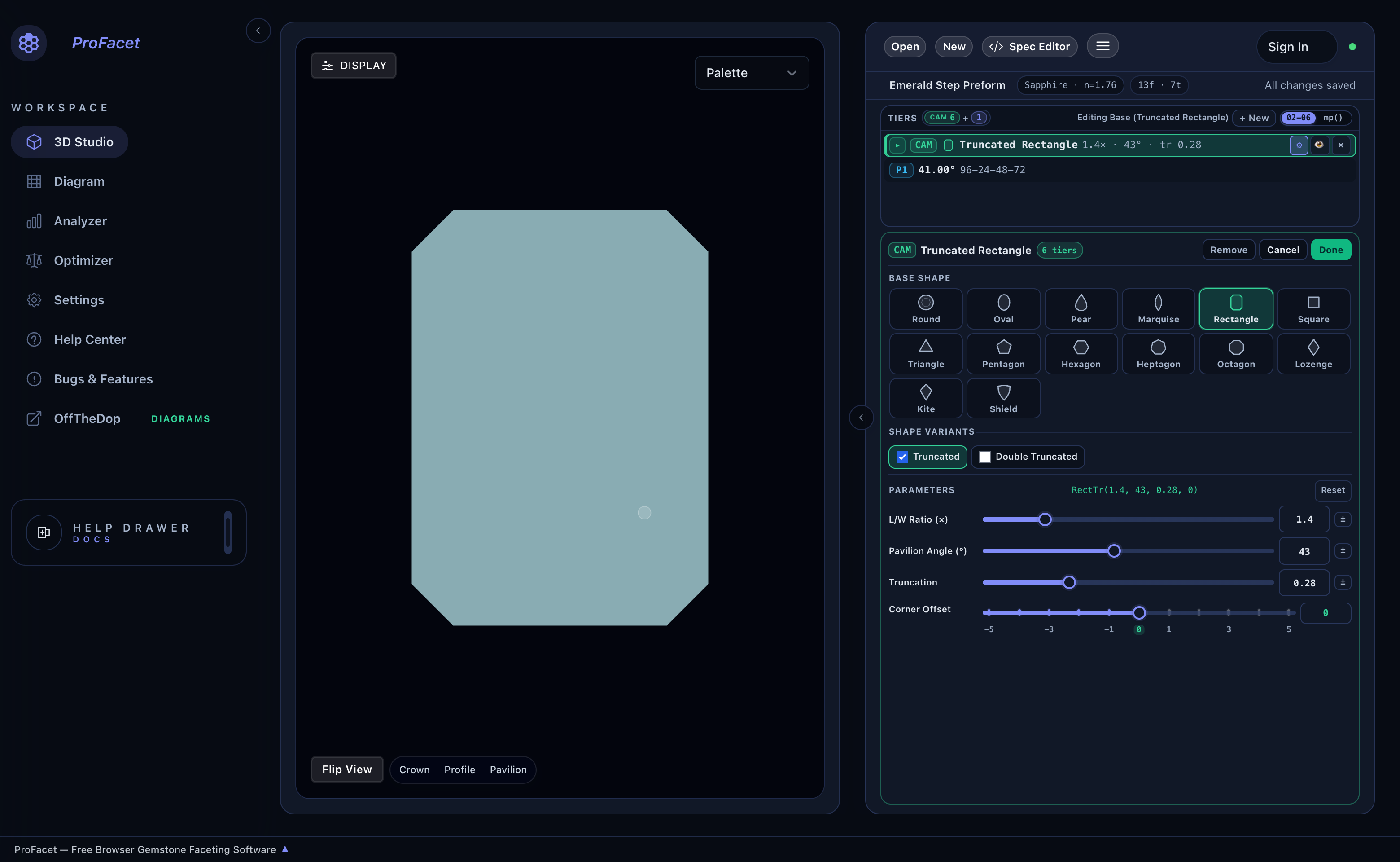
Inside the CAM Preform Studio, you can:
- Select Any of 12 Base Shape Families:
Round,Oval,Pear,Marquise,Rectangle,Square,Triangle,Pentagon,Hexagon,Heptagon,Octagon,Lozenge,Kite, orShield. - Enable Shape Modifiers: Check
Truncated(to bevel sharp corners, turning aRectangleinto an EmeraldRectTror aTriangleinto aTriangleTr),Double Truncated(RectDblTr), orCushion(to curve straight sides outward). - Drag Live Shape Sliders: Adjust
L/W Ratio (×),Pavilion Angle (°),Truncation,Cushion,Belly, orCorner Offset, and click±next to any slider if you want the GPU Optimizer to tune the stone's outline proportions! - Click
Doneto return to the Tiers table.
3. Live Interactive CAM Preform Explorer
Use the interactive widget below to experiment with all 28 built-in CAM Preform Functions right on this page. Pick any shape, drag its parameter sliders, and inspect both the 2D outline and the generated PF/G tiers:
4. Complete Reference of Built-In CAM Preform System Functions
Every CAM function below can be configured visually in the CAM Preform Studio or called directly in FSL and Lua:
Round, Oval, Pear, Marquise, Lozenge & Kite Families
| Function Signature & Defaults | Shape Description | Key Parameters |
|---|---|---|
Round(angle=43, sym=10) | Regular sym-sided circular preform (Round(43, 16) for standard 16-facet round). | angle: CAM angle (43°); sym: facet count (8, 12, 16, 24). |
Oval(angle=45, lwr=1.2, segmentsPerQuad=5) | Smooth elliptical outline walking segmentsPerQuad facets per quadrant. | angle: base CAM angle; lwr: length/width ratio (1.15–1.65); segmentsPerQuad: 2..8. |
Marquise(angle=43, lwr=1.80, segmentsPerQuad=4) | Pointed boat-shaped navette outline (gear divisible by 4). | angle: base angle; lwr: L/W ratio (1.25–2.50); segmentsPerQuad: 2..7. |
Pear(angle=43, lwr=1.55, segments=4) | Teardrop outline combining a rounded base with a pointed tip. | angle: base angle; lwr: L/W ratio (1.25–2.20); segments: 3..6. |
Lozenge(angle=43, lwr=1.60) | Four-sided diamond lozenge (gear divisible by 4). | angle: base angle; lwr: L/W ratio (1.05–2.60). |
Kite(angle=43, lwr=1.55, headRatio=0.34) | Asymmetric four-sided kite (gear divisible by 4). | angle: base angle; lwr: L/W ratio (1.15–2.40); headRatio: top-to-bottom split (0.20–0.44). |
Square & Rectangle (Step / Emerald / Cushion / Radiant) Families
| Function Signature & Defaults | Shape Description | Key Parameters |
|---|---|---|
Rect(lwr=1.5, angle=45) | Straight 4-sided baguette / rectangular preform (Rect(1.0, 43) or Round(43, 4) for a square). | lwr: L/W ratio; angle: long-side CAM angle. |
RectTr(lwr=1.5, angle=45, truncation=0.3, offset=0) | Classic 8-sided Emerald Cut (truncated rectangle). | lwr: L/W ratio; angle: base angle; truncation: corner bevel (0.15–0.45); offset: tooth nudge. |
RectDblTr(lwr=1.5, angle=45, first_truncation=0.3, second_truncation=0.2, offset=0) | 12-sided double-truncated rectangle with two-step corner chamfers. | lwr: L/W ratio; angle: base angle; first_truncation, second_truncation: outer/inner corner bevels. |
SquareTr(angle=42, truncation=0.3) / SquareTrMir(angle=42, truncation=0.5, offset=4) | Cut-corner square (Asscher / Radiant outline) and mirrored variant. | angle: base angle; truncation: corner bevel; offset: mirror index offset. |
SquareCurved(angle=45, c1=2, c2=4) | Curved-side square cushion using index offsets c1 and c2. | angle: base angle; c1, c2: curve tooth offsets. |
SquareCushTr(cushion=1, angle=45, truncation=0.4) / SquareCushTrMir(cushion=1, angle=45, truncation=0.4, offset=2) | Cut-corner square cushion (Barion / antique cushion) and mirrored variant. | cushion: side curve index offset; angle: base angle; truncation: corner bevel. |
Triangle, Shield & Polygon (Pent*, Hex*, Hept*, Oct*) Families
| Function Signature & Defaults | Shape Description | Key Parameters |
|---|---|---|
TriTr(truncation=0.25, angle=42) / TriTrMir(truncation=0.25, angle=42, offset=4) | Truncated 3-sided triangle (Trilliant) and mirrored variant. | truncation: corner bevel (0.15–0.45); angle: base angle; offset: mirror tooth offset. |
TriCurved(angle=45, c1=2, c2=4) | Curved-side 3-fold trilliant using index offsets c1 and c2. | angle: base angle; c1, c2: curve tooth offsets. |
TriCushTr(truncation=0.25, angle=42, cushion=1) / TriCushTrMir(..., offset=2) | Cushioned truncated triangle (FVS-90 style) and mirrored variant. | truncation: corner bevel; angle: base angle; cushion: side curve index offset. |
Shield(angle=45) | Mirrored 3-fold shield outline (gear divisible by 6). | angle: base CAM angle. |
Pentagon(angle=43), Hexagon(angle=43), Heptagon(angle=43), Octagon(angle=43) | Regular 5-, 6-, 7-, and 8-sided polygons (plus *Tr, *TrMir, *Curved, *CushTr, and *CushTrMir variants for each polygon family!). | angle: base CAM angle; truncation, offset, c1, c2 for truncated/curved/cushioned variants. |
Next, learn how to transcribe any printed book or magazine diagram into ProFacet in seconds using Chapter 5: Decoding Classic Diagrams — The Symmetry Assistant.