Chapter 1: How Gemstones Are Cut (In Life & In ProFacet)
Before we turn a dial or click a button, let’s spend three minutes understanding what a faceted gemstone actually is and how a physical faceting machine shapes it. Once you have this mental model, every single control in ProFacet Studio—and every line of FSL or Lua in Part II—will make intuitive sense.
1. The Three Anatomy Zones of a Gemstone
Every faceted gemstone is divided into three structural regions separated by a horizontal equator:
- The Girdle (
G,90°): The narrow vertical belt around the outer edge of the stone. Jeweler's prongs grip the girdle, and its silhouette defines whether the stone is a Round, Oval, Emerald, Pear, or Marquise. - The Pavilion (
P, cut from below): The conical bottom half of the stone. Contrary to popular belief, you are not supposed to see through the bottom of a gemstone! The Pavilion's facets are angled like a hall of mirrors so light entering from above bounces off one pavilion facet, crosses to the opposite pavilion facet, and reflects straight back up toward your eye. - The Crown (
Cand TableT, cut from above): The upper dome of the stone. The flat central Table (T,0°) lets light in and out, while the angled Crown facets (C1,C2,C3) act as miniature prisms that bend exiting light into flashes of rainbow fire.
2. How a Physical Faceting Machine Cuts a Stone
A physical faceting machine holds your rough crystal on the end of a metal rod called a dop and lowers it onto a spinning diamond-coated disc called a lap. To place a flat facet anywhere on the 3D crystal, the cutter controls three degrees of freedom:
| Control on a Physical Machine | Control in ProFacet Studio | What It Does |
|---|---|---|
1. Index Gear Tooth (0–96) | IDX Drum Dial (and SYM / MIR drums) | Rotates the dop around its central axis in precise steps. On a standard 96-tooth gear, each tooth rotates the stone by 360° / 96 = 3.75°. Tooth 96 (or 0) is top dead center (12 o'clock). |
2. Mast Angle (0.00°–90.00°) | Vertical ANGLE Mast | Tilts the dop relative to the lap:
|
| 3. Mast Height / Depth | Vertical DEPTH Mast, ↓ Jump, and +Meet | Lowers the stone onto the lap until the new flat facet touches an existing corner on the stone—called a meetpoint! |
3. Why Refractive Index (RI) & the Critical Angle (θc) Rule Everything
Why can't you cut a Quartz gemstone (RI = 1.54) using the exact same Pavilion angles as a Diamond (RI = 2.42)?
When a ray of light travels inside a gemstone and strikes a Pavilion facet from the inside, one of two things happens depending on the angle at which it hits the facet:
- Above the Critical Angle (
θ > θc) — Total Internal Reflection (TIR): The facet acts as a 100% perfect mirror, bouncing all of the light back inside the stone toward the Crown. - Below the Critical Angle (
θ < θc) — Windowing (Light Leakage): The ray refracts right through the bottom of the stone and escapes into the mounting! When you look straight down into a poorly angled stone and can read newsprint through its center, that dead, see-through hole is called a window.
The threshold between mirror reflection and leakage is the material's Critical Angle ():
| Gemstone Material | Refractive Index (RI) | Critical Angle (θc) | Typical Pavilion Main Angle (P1) |
|---|---|---|---|
| Quartz / Amethyst / Citrine | 1.54 | 40.49° | 41.5° – 43.0° |
| Beryl / Emerald / Aquamarine | 1.58 | 39.26° | 41.0° – 42.5° |
| Topaz / Tourmaline | 1.62 | 38.12° | 40.5° – 42.0° |
| Spinel | 1.72 | 35.55° | 40.0° – 41.5° |
| Sapphire / Ruby (Corundum) | 1.76 | 34.62° | 40.0° – 41.5° |
| Cubic Zirconia (CZ) | 2.15 | 27.72° | 39.5° – 41.0° |
| Diamond | 2.42 | 24.41° | 40.6° – 41.0° |
| Moissanite | 2.67 | 22.00° | 39.5° – 40.8° |
[!TIP] Built-In Critical Angle Guard in ProFacet Look at the bottom of the vertical
ANGLEmast in the Interactive Slicer: ProFacet continuously calculates and displaysθcfor your active material (e.g.,θc 40.5°for Quartz orθc 34.6°for Sapphire) so you never accidentally cut your Pavilion below the critical angle!
4. Tour of the ProFacet Studio Workspace
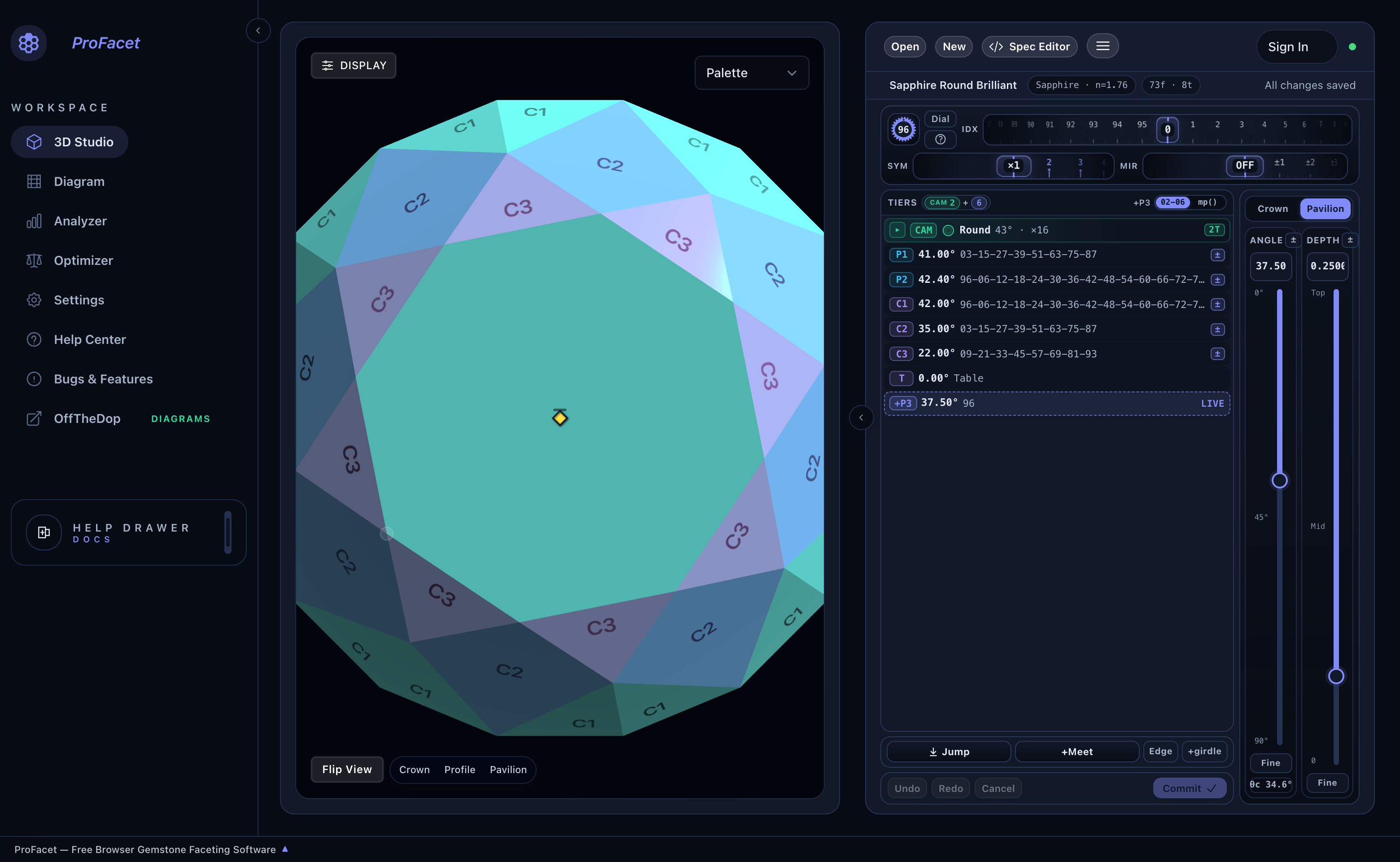
When you open ProFacet Studio, your screen is organized into three panes:
- Left Navigation Rail (
WORKSPACE): Switch between the 3D Studio, Diagram (Printable Cutting Instructions), Analyzer (19-angle WebGPU optical sweep), Optimizer (automated multi-variable GPU tuning), Settings, and the slide-over Help Drawer. - Center 3D Viewport: Your interactive gemstone stage with 8 shading modes (
Raytraced,Palette,Mono,ASET,Window,Fire,Scintillation,BDPT), display overlays (Facet Info,Wireframe,Explosion), and one-click camera presets (Flip View | Crown | Profile | Pavilion). - Right Workbench Pane: Switch freely between the visual Interactive Slicer (
Slicer) and the code-based Spec Editor (</> Spec Editor). They stay 100% synchronized at all times.
Now that you know how the machine and the Studio fit together, let’s cut a complete Round Brilliant Quartz Gemstone from scratch in Chapter 2: Guided Tutorial — Cut Your First Round Brilliant.